
PayPal Fees in Bookkeeping: UK Business Guide 2026

A PayPal payout may not match your sales total because it isn’t meant to. PayPal collects customer payments, deducts fees and may hold funds before sending a payout to your bank. The figures can look wrong, especially when refunds or currency conversions are involved. Handling paypal fees in bookkeeping means recording each part clearly, rather than treating the amount deposited as your total sales.
It’s understandable to focus on the bank deposit. It’s the money you can see, and matching it to your records should be simple. But recording only the net payout can understate your income and hide the fees that reduced the amount received. Treating PayPal as a clearing account gives you a clear way to track the journey from customer payment to bank deposit.
This guide explains how to record gross customer receipts and PayPal fees separately, reconcile your PayPal balance with bank deposits, and account for refunds and currency conversions. You’ll also see how to use payment-provider records to support reliable eCommerce reporting and keep your bookkeeping organised as transaction volumes grow.
Key Takeaways
- Follow each payment from customer sale through PayPal activity to the bank transfer, keeping income, fees and transfers clearly categorised.
- Handling paypal fees in bookkeeping is easier when you compare PayPal activity reports with your accounting entries and bank statements.
- Trace refunds, disputes and currency movements to their supporting PayPal records so unusual entries don’t leave unexplained differences.
- Check timing differences and other common causes of unmatched balances before treating a reconciliation gap as an error.
- A consistent bookkeeping routine can make eCommerce reporting clearer as transaction volumes and sales channels grow.
Bookkeeping PayPal Fees: Why Payouts Do Not Match Sales
Your customer pays the order total, but the amount arriving in your business bank account is often lower. PayPal may deduct a processing fee, and a payout may combine activity from several orders or include refunds and other adjustments. Record the customer sale, PayPal’s fee and the transfer to your bank as separate entries, so the sales figure doesn’t get lost in the net deposit.
A PayPal clearing account temporarily tracks money received and fees or other movements processed through PayPal before funds reach your bank. It lets you follow the balance from customer payment to payout, rather than treating the bank deposit as the sale itself.
This approach applies basic bookkeeping principles: record what happened and keep connected entries visible. For eCommerce businesses, that creates a clearer trail between order records, PayPal activity and bank statements. It also makes it easier to identify why a balance changed, instead of forcing every difference into sales or costs.
What is a PayPal fee in bookkeeping?
A PayPal fee is a charge associated with processing a payment through PayPal. The customer transaction is the sale: the amount paid for the goods or services. The fee is a separate amount PayPal deducts for its payment service. Recording only the net amount can hide both the full sales value and the cost of processing the payment.
Keep the fee amount and its supporting PayPal transaction details with your bookkeeping records. Don’t decide how a fee should be treated for tax or VAT purposes based on the bank deposit alone. The correct treatment depends on current UK guidance and the relevant records.
Why does a PayPal payout differ from the order total?
A payout reflects PayPal balance activity, not necessarily one customer order. The basic relationship is:
- Gross receipts: customer payments recorded before deductions.
- Less fees and other deductions: charges or adjustments shown in PayPal activity.
- Net balance movement: the amount left in the PayPal account after those entries.
- Bank transfer: the amount moved from PayPal to your business bank account.
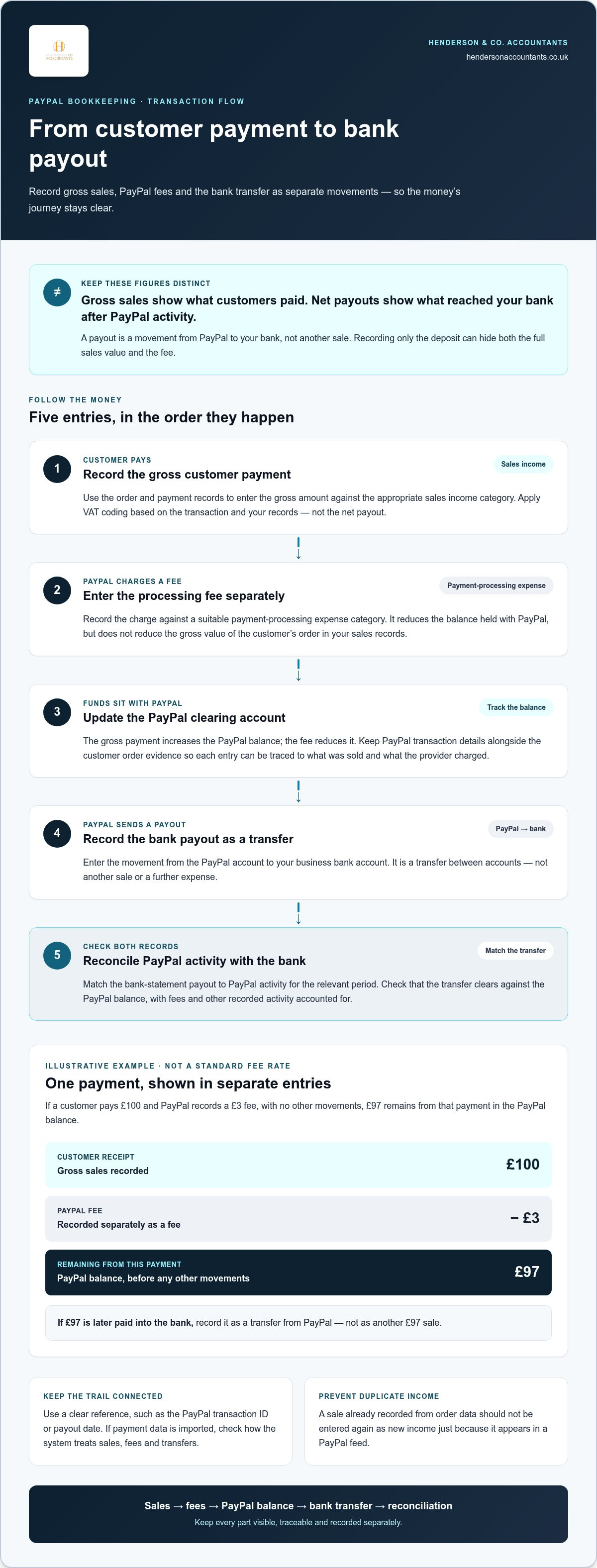
Illustrative example, not a standard fee rate: a customer pays £100, and PayPal records a £3 fee. If there are no other movements, £97 remains from that payment in the PayPal balance. The bookkeeping should show £100 of customer receipts and the £3 fee separately. A later £97 bank deposit is a transfer from PayPal, not another £97 sale.
The actual bank payout may not match this single-payment example. PayPal may combine several transactions, while refunds, adjustments or an existing balance can change the amount transferred. Funds may also remain in the PayPal balance before being sent to the bank, so the payment date and payout date may differ. Compare PayPal activity for the relevant period with the bank statement, then trace each amount through the clearing account before deciding there’s an error.
How to record PayPal fees in bookkeeping: the transaction flow
Once you’ve identified the parts of a PayPal transaction, record them in the order they happen. A dedicated PayPal account in your bookkeeping software gives you a place to track incoming customer payments, deductions and money still held by the provider. This keeps each stage visible and makes the eventual bank reconciliation easier to follow.
- Record the customer payment. Use the order and payment records to enter the gross amount against the appropriate sales income category. Apply the relevant VAT coding based on the transaction and your records, rather than using the net payout as the sales figure.
- Enter the PayPal fee separately. Record the processing charge against a suitable payment-processing expense category. The fee reduces the balance held with PayPal, but it doesn’t reduce the gross value of the customer’s order in your sales records.
- Update the PayPal balance. The gross payment increases the balance in the PayPal account; the fee reduces it. Keep PayPal transaction details alongside the customer order evidence so each entry can be traced to what was sold and what the provider charged.
- Record the bank payout as a transfer. When PayPal sends money to your business bank account, enter the movement from the PayPal account to the bank account. It’s a transfer between accounts, not another sale or a further expense.
- Reconcile both sides. Match the payout shown in your bank statement to PayPal activity for the relevant period. Check that the transfer clears against the PayPal balance, with fees and other recorded activity accounted for.
Gross sales show what customers paid; net payouts show what reached your bank after PayPal activity. Keeping them in separate entries preserves both figures and prevents a transfer from being counted twice as income. It also helps you see whether a remaining balance relates to transactions that PayPal hasn’t yet paid out.
If your accounting system imports payment data, review how it treats sales, fees and transfers before relying on the entries. A transaction already recorded from order data should not be entered again as new income simply because it appears in a PayPal feed. Use consistent categories and a clear reference, such as the PayPal transaction ID or payout date, to make later checks more straightforward.
For broader guidance on organising online sales records, see the e-commerce bookkeeping guide for UK sellers. A consistent process is the practical foundation of handling paypal fees in bookkeeping, particularly when sales come through multiple channels. Henderson & Co. Accountants provides eCommerce bookkeeping support to help keep payment-provider records aligned with wider reporting.
PayPal fees, refunds and currency conversions: handling exceptions
Not every PayPal entry is a straightforward customer payment followed by a fee. Refunds, disputes and currency conversions can each affect the balance differently. Identify the underlying transaction, check the PayPal activity and supporting records, then record the event once in the right place.
| PayPal activity | Bookkeeping focus |
|---|---|
| Ordinary payment | Match the customer order to the gross receipt and record the fee separately. |
| Refund | Link the returned amount to the original sale and reflect the movement out of the PayPal balance. |
| Dispute or chargeback | Record the adjustment and any related fee shown in PayPal activity; distinguish it from a customer refund. |
| Currency conversion | Keep the original transaction currency, converted amount and any conversion charge visible in the records. |
How should PayPal refunds and reversals be recorded?
Where the records allow, match a refund to the original customer transaction using the order reference, PayPal transaction details and refund date. Record the refund against the original sale or the appropriate returns category, and show the resulting reduction in the PayPal balance. Don’t enter it as a fresh expense as well as a reduction to sales, or the same refund may be counted twice.
A dispute or chargeback isn’t automatically the same as a refund. Check its status and outcome in PayPal records, and record any reversal or charge separately from the original sale. PayPal may retain the original processing fee when you refund a customer, so compare the refund amount with the fee activity instead of assuming both amounts reverse.
What changes when PayPal converts currencies?
For an overseas sale, retain the amount and currency charged to the customer alongside the amount PayPal converts and credits to your balance. Use the conversion details shown in PayPal’s records, including any separately identified charge, rather than estimating an exchange rate from the eventual bank deposit.
Keep the order, PayPal transaction and conversion evidence together. This gives you a traceable explanation for differences between the original sale value and the amount received in pounds sterling, and helps prevent a conversion movement from being mistaken for another sale or fee.
VAT on PayPal fees is a records-led question. Review the fee invoice or other supporting document and apply the relevant treatment using current UK guidance; don’t assume VAT can be reclaimed simply because a fee appears in the account. Clear evidence matters. Handling paypal fees in bookkeeping means recording each exception in line with the actual PayPal activity, so your balance and supporting records tell the same story.
A practical PayPal bookkeeping routine for accurate reconciliation
A regular review makes PayPal differences easier to explain before they build up. Choose a consistent bookkeeping period, then compare the provider’s activity with your accounting entries and bank statement. The aim isn’t just to make the balances agree. It’s to understand and document the transactions behind them.
What records should you review each bookkeeping period?
Start with the PayPal activity report for the period and compare its payments, fees, refunds and transfers with the entries in your accounts. Then match each bank deposit to the corresponding PayPal payout record. Keep order records, invoices, statements and fee documentation organised together, using transaction references or dates to find supporting evidence quickly.
A simple close routine can keep the review consistent:
- Download or access the PayPal activity report for the period being checked.
- Compare recorded customer sales, fees and refunds with the relevant activity.
- Match each PayPal payout to the bank statement, allowing for differences in processing dates.
- Check that the closing PayPal balance in your accounts agrees with the balance supported by PayPal records.
- Note any unresolved items, what you checked and what evidence is still needed.
How can you spot and resolve common reconciliation differences?
When a figure doesn’t match, trace it back to the transaction rather than adding a balancing entry straight away. A payout initiated near the end of a period may appear in the bank later. Check the PayPal transaction and payout dates before treating it as missing; the timing difference may clear in the next period.
Other common causes include:
- Fees: a fee may be missing, duplicated or posted to the wrong expense category.
- Refunds: a return may not yet be recorded or may be entered twice.
- Duplicate imports: a transaction entered from order records may also have been imported from a payment feed.
- Currency movements: the converted amount may differ from the original transaction value, with PayPal’s records showing the movement.
Check transaction references, dates and amounts across the report, accounting entries and bank statement. If the difference remains unexplained, leave a clear note and arrange a review rather than forcing the balances to agree with an unsupported adjustment. Accurate handling paypal fees in bookkeeping depends on keeping the reason for each entry visible, not simply clearing the difference.
For broader guidance on matching payment activity across online sales, the eCommerce accounting guide for UK sellers explores wider record-keeping considerations. If reconciling PayPal alongside multiple sales channels is becoming difficult to manage, discuss eCommerce bookkeeping support to help bring payment records into a consistent routine.
When eCommerce bookkeeping support can simplify PayPal fees
A PayPal process that works well for a small number of orders can become harder to manage as sales grow. More transactions mean more fees, refunds and payouts to trace. Add other marketplaces or sales channels, and you may need to compare several sets of records before your eCommerce figures make sense. In these scenarios, small business owners often turn to firms like Skyplex Management for specialised bookkeeping and accounting services to keep multi-channel records organised.
Signs your PayPal bookkeeping process needs attention
Look for recurring issues, not just a one-off timing difference. PayPal balances that don’t agree with your accounts, regularly missed fees or refunds, and inconsistent expense categories can all point to a process that needs review. Another warning sign is being unable to trace a bank payout back to its PayPal activity and the underlying customer orders without lengthy manual searching.
These gaps can make it harder to understand sales performance and prepare reliable financial information. A clear, repeatable method for handling paypal fees in bookkeeping helps keep payment records useful as transaction volumes and sales channels increase.
Bring payment-provider records into a clearer eCommerce finance process
Specialist eCommerce bookkeeping can bring activity from multiple sales channels into a consistent reporting process. Henderson & Co. supports online retailers with eCommerce accounting and bookkeeping, helping keep payment-provider records organised alongside wider business transactions. The aim is a clear picture of income, fees and balances, rather than a collection of deposits that are difficult to interpret.
A well-planned cloud bookkeeping workflow can also make routine reviews more manageable. Xero cloud accounting setup can form part of that process, with records and categories organised to suit the business. The bookkeeping method should reflect the transactions and supporting evidence accurately, whether entries are imported or recorded using reports.
If you’re comparing accounting software for an online business, the Xero and QuickBooks for eCommerce comparison can help you consider how each option may fit your workflow. Whichever system you use, consistent categorisation and regular review are what make its reports meaningful.
Good records also support clearer reporting and help you maintain information needed for your business’s tax and VAT responsibilities. If payment-provider bookkeeping is taking time away from running your business, explore eCommerce bookkeeping support to build a more structured approach to your sales and payment records.
Build a finance process that grows with your business
As your online business develops, your bookkeeping should give you more than a record of past transactions. Clear, dependable financial information can help you understand how different sales channels are performing and make considered decisions about what to do next. That starts with a process you can maintain as the business changes.
Getting handling paypal fees in bookkeeping right is part of building that stronger foundation. Henderson & Co. provides specialist accounting for online retailers and digital businesses, alongside bookkeeping and Xero cloud accounting setup for UK businesses. The focus is on making your financial records work for the way your business operates, without adding unnecessary complexity.
Explore eCommerce accounting support from Henderson & Co. and take a practical next step towards clearer business reporting. With the right structure in place, you can spend less energy untangling payment records and more time moving your business forward.
Frequently Asked Questions
Should PayPal fees be recorded separately from sales income?
Yes. Record the customer’s payment as sales income and the PayPal charge separately as a payment-processing cost. This keeps your sales figures from being reduced by provider charges and makes it easier to review payment costs over time. For example, when comparing sales from two online channels, consistent fee categories help you see the processing costs associated with each one.
How do I reconcile PayPal fees with a bank payout?
Compare PayPal activity for the payout period with the deposit on your bank statement. Check that the payment records, fees, refunds and other adjustments explain the change in the PayPal balance, then match the payout to the bank entry as a transfer. If the amounts differ, check transaction and payout dates first. A transfer near the end of a bookkeeping period may appear in the bank later.
Can I record only the net PayPal payout in my bookkeeping?
It’s not a good approach for complete sales records. The net payout doesn’t show the full amount customers paid or how much PayPal deducted in fees. In handling paypal fees in bookkeeping, record sales and provider charges distinctly, then show the payout as a transfer between accounts. This gives you a more useful view of revenue and payment costs, and helps avoid treating the bank deposit as the original sale.
Are PayPal fees an allowable business expense in the UK?
PayPal charges for business transactions are generally recorded as business costs, but whether they’re deductible for tax depends on the circumstances and current UK rules. Keep PayPal statements and fee documentation, and separate business activity from personal payments. Don’t assume every charge is deductible simply because it appears on a PayPal statement. Check the treatment against up-to-date HMRC guidance or seek advice based on your business records.
Can I reclaim VAT on PayPal fees?
Only reclaim VAT where the supporting documentation shows VAT has been charged and your business is entitled to recover it under the applicable rules. Review the relevant PayPal invoice or fee document rather than assuming VAT applies to every charge. Keep the evidence with your bookkeeping records and use current HMRC guidance when preparing your VAT records. If the document or treatment is unclear, resolve that before including an amount as input VAT.
How should I record a PayPal refund in bookkeeping?
Record the refund against the original customer sale where your order and PayPal records allow you to match them. Check the amount actually returned and the date it left the PayPal balance. Also review the original fee entry, as a refund doesn’t necessarily mean the processing charge has been returned. Keep the refund confirmation with the order record so you can explain the adjustment if the customer payment is reviewed later.
How do I account for PayPal fees when a payment is converted into pounds?
Use PayPal’s transaction details to document the original payment currency, the amount converted into pounds sterling and any separately identified conversion charge. Record the sale and conversion using a consistent approach in your accounts, supported by the transaction evidence. Don’t estimate the GBP value from a later bank deposit, as that may include other payments or adjustments. Retain the conversion record so the difference can be traced to the underlying sale.