
Making Tax Digital for VAT: 2026 UK Business Guide

What if choosing compatible software is only one part of making tax digital vat compliance? In 2026, every VAT-registered business must follow Making Tax Digital rules, but the real challenge is often keeping sales, fees and VAT records connected from source to return. If you sell through marketplaces or use spreadsheets alongside accounting software, it can be hard to see whether information is moving through the right digital links.
You’re right to ask what HMRC expects. MTD for VAT isn’t simply a new way to file: you need to keep specified VAT records digitally and use compatible software to submit your return. Copying figures manually between systems can break the digital journey, even when the final numbers look correct.
This guide explains which records to keep, how return figures reach HMRC and how to build a dependable process around your sales channels. You’ll also see where Xero setup, bookkeeping and VAT return preparation can help bring multi-channel records together, so you can approach your next return with greater clarity and confidence.
Key Takeaways
- Understand which VAT-registered businesses need to follow making tax digital vat requirements in 2026.
- Learn what sales and purchase details to record digitally so your VAT figures have a clear transaction trail.
- See how compatible software and digital links connect your records to an HMRC VAT return.
- Use a practical checklist to review your accounting access, sales-channel data, VAT settings and task responsibilities.
- Explore how specialist eCommerce bookkeeping, Xero setup and VAT return preparation can support reliable reporting across multiple channels.
What is Making Tax Digital for VAT, and who must follow it?
Making Tax Digital (MTD) for VAT is HMRC’s digital process for keeping VAT records and submitting VAT returns through compatible software. The key requirement is not simply to use a computer: the records, calculations and submission need to form a reliable digital process.
Making Tax Digital for VAT means keeping required VAT records digitally and using compatible software to submit VAT returns to HMRC. For an overview of the programme’s history and scope, see Making Tax Digital (MTD) on Wikipedia.
Which VAT-registered businesses need to use MTD?
MTD for VAT applies to VAT-registered businesses, regardless of turnover. It has been mandatory for all VAT-registered businesses since April 2022. Turnover can affect whether a business must register for VAT, but once registered, the digital process is generally required too. VAT registration duties and MTD duties are related, but they are not the same question.
HMRC recognises limited circumstances in which a business may be exempt or eligible for an exception. These depend on the business’s situation, so check HMRC’s current eligibility guidance rather than assuming that business size or the way you keep accounts creates an exemption. If you’re unsure, establish your registration status first, then confirm what digital requirements apply to you.
What MTD VAT changes, and what it does not
MTD changes how you keep and send VAT information, not the VAT rates or the underlying rules for calculating what you owe. You still work out VAT on sales and purchases under the rules that apply to your business. The digital process should preserve a clear trail from transaction records to the figures reported on your return.
It also doesn’t automatically change your VAT return period. Your existing VAT periods generally continue unless your arrangements change. A business that files quarterly, for example, can continue on that cycle while keeping its records digitally and submitting each return through compatible software.
Keep MTD for VAT separate from Making Tax Digital for Income Tax Self Assessment (MTD for ITSA). The programmes cover different taxes and reporting requirements. MTD for ITSA begins on 6 April 2026 for people who meet the qualifying income rules, but that doesn’t replace or alter a VAT-registered business’s MTD VAT obligations.
In practical terms, the first questions are whether your business is VAT-registered, whether an HMRC exception applies, and how your records connect to the software used for filing. Getting those points clear helps you focus on the next step: identifying which transaction details your digital records need to capture.
MTD VAT digital records: what must your business keep?
Your digital records should let you follow the journey from an individual transaction to the figures on your VAT return. That means keeping the information HMRC requires in digital form and retaining enough detail to understand how sales, purchases and adjustments were treated. The precise record fields can vary with the type of transaction or VAT accounting scheme, so use the official GOV.UK guidance on Making Tax Digital for VAT alongside your own records.
For a typical transaction, the digital record includes the tax point or time of supply, the value excluding VAT and the VAT rate charged or applied. Purchase records should also support the input VAT you reclaim. Your records need to make the treatment traceable: if a transaction is zero-rated, exempt, standard-rated or subject to a special rule, you should be able to identify how it was recorded and why.
Which transaction details should digital records capture?
HMRC’s VAT record-keeping requirements cover transaction-level information as well as totals and adjustments used in the VAT return. Keep digital details for supplies made and received, and record adjustments that affect VAT due or reclaimable. The VAT account should bring together totals such as output tax and input tax, plus relevant adjustments, so the return figures can be traced back to the underlying entries.
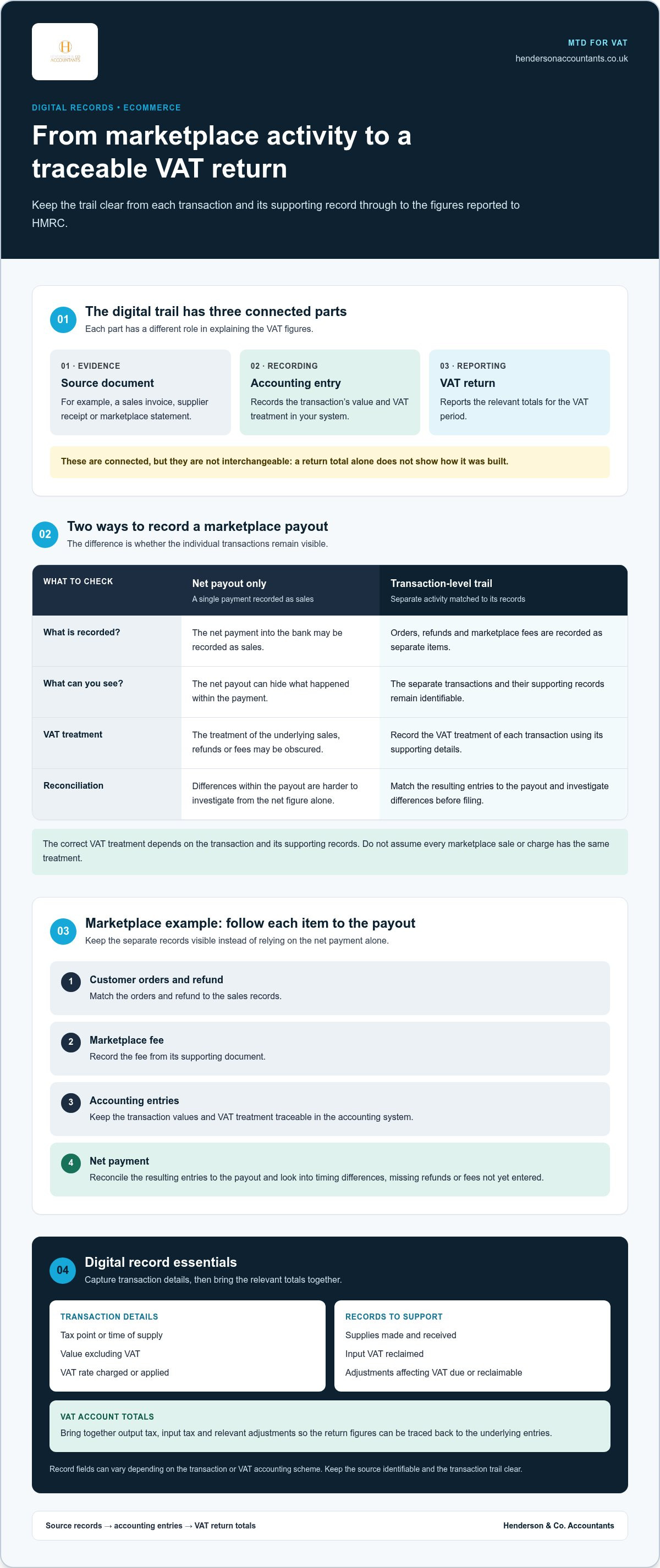
A source document, such as a sales invoice or supplier receipt, provides evidence of a transaction. The accounting entry records its value and VAT treatment in your system. The VAT return then reports the relevant totals for the period. These are connected, but they aren’t interchangeable: a return total alone won’t show how it was built, whilst a folder of invoices may not show how each item was entered and included in the return.
How should eCommerce sellers organise VAT records?
Online retailers often need to bring together order data, refunds, marketplace statements, payment processor reports and purchase invoices. Keep each source identifiable, then reconcile it to the accounting entries. This makes it easier to investigate a difference before filing instead of relying on a net payout that hides what happened.
For example, a marketplace statement might show customer orders, a refund and a commission fee, followed by one net payment into your bank. Recording only that payment as sales can obscure the separate transactions and their VAT treatment. Instead, match the orders and refund to sales records, record the marketplace fee from its supporting document, and reconcile the resulting entries to the payout. The correct treatment depends on the transaction and supporting records, so don’t assume every marketplace charge or sale has the same VAT treatment.
A consistent process makes discrepancies easier to spot: investigate timing differences, missing refunds or fees that haven’t been entered before finalising the return. The eCommerce bookkeeping guide offers further help with organising multi-channel records. If sales data from several platforms is difficult to bring together, specialist bookkeeping and Xero setup can help create a clearer route from source transactions to VAT reporting.
MTD VAT software and digital links: how to choose a workable process
Compatible software provides the route for keeping or connecting VAT records and submitting returns digitally to HMRC. The important question isn’t just which software you use. It’s whether information can move from the original transaction through your records and calculations to the return without breaking the digital trail.
A digital link is an electronic transfer of data between parts of your record-keeping and filing process. For example, one system might pass sales totals to your accounting software, which then submits the return. Manually typing figures from one system into another, or copying them across, can interrupt that link and create compliance concerns. Check HMRC’s current guidance and software compatibility information against your particular workflow.
There are a few common approaches, each with different practical considerations:
- Connected accounting software: Records and VAT return figures are managed within one platform or transferred between connected systems. This can make the journey easier to follow, provided the setup captures the relevant transactions accurately.
- Spreadsheet records with bridging software: You may be able to keep records in a spreadsheet and use bridging software to submit the return. The connection must meet HMRC’s digital-link requirements; a spreadsheet and a bridging tool don’t automatically make every workflow compliant.
- Disconnected manual processes: Re-keying figures or moving totals by hand between separate records and filing tools can break the digital journey. It may also make errors harder to trace back to their source.
When can spreadsheets form part of an MTD VAT process?
A spreadsheet may form part of a compliant process if the required records are maintained digitally, the necessary links between software are preserved and compatible bridging software submits the return. Avoid assuming that a manually copied total is a digital link. HMRC’s detailed requirements can depend on the process, so check the latest guidance before relying on a spreadsheet-based workflow.
What makes an eCommerce accounting workflow easier to manage?
Look at the whole process: how sales-channel data enters the accounts, how refunds and fees are recorded, how balances are reconciled and how VAT figures reach the return. The right setup depends on your transaction volume, sales platforms and existing systems. A workflow that suits one online retailer may not suit another.
For instance, if marketplace reports and payment processor records arrive separately, your bookkeeping process needs to bring them into the accounts in a way that keeps each figure traceable. A clear reconciliation routine can help identify missing entries or differences before you prepare a return. The eCommerce accounting guide explores how accounting processes can support online sales. If your current setup feels disjointed, Xero cloud accounting setup can be a practical step towards connecting records and VAT reporting for making tax digital vat compliance.
How to prepare for MTD VAT: a practical compliance checklist
A reliable Making Tax Digital VAT routine starts well before the return is due. Set clear ownership for each task, especially if orders, refunds and fees arrive through several sales channels. Regular checks give you time to investigate differences instead of trying to resolve them at the last minute.
The essential stages are to review your records, confirm system access and VAT settings, reconcile channel data, investigate exceptions, check the return and submit it through your compatible software process.
How to check your records before filing
Reconcile sales, refunds and marketplace or payment fees to source reports, then check purchase records against invoices and receipts. If something doesn’t match, record what you investigated, how you resolved it and which supporting documents you retained. Review unusual VAT treatments and adjustments with appropriate accounting support rather than assuming a familiar transaction has the same treatment in every case.
What should happen before a VAT return is submitted?
Confirm the return covers the correct VAT period, review transaction totals and VAT calculations, and make sure the figures follow through to the return. Check the current filing and payment deadlines with HMRC for your business and period. Don’t rely on a generic date, as your own deadline depends on your VAT arrangements.
- Review your records: Check that sales, purchases, refunds, fees and adjustments are entered and supported by source information.
- Confirm access: Make sure the people responsible can access the accounting system, sales-channel reports and HMRC filing process they need.
- Check channel data: Identify how order, refund, fee and payment information from each platform reaches your accounting records.
- Review VAT settings: Check that the settings reflect the business’s transactions and that unusual treatments or adjustments have been considered.
- Reconcile, review and test: Resolve differences, review the return figures and test that your software process can submit the return before the deadline.
Quick pre-filing checklist
- Sales and purchase records are complete and supported.
- Refunds, fees and adjustments have been checked against source reports.
- VAT settings and return period have been reviewed.
- Responsibilities for review, submission and payment are clear.
- Current HMRC deadlines have been confirmed.
Build reconciliation into your routine, not just the final filing check. For an online seller, comparing each platform’s sales and refund report with accounting entries can reveal missing transactions, duplicate imports or timing differences while there’s still time to investigate. Keep a simple record of open queries, who owns each one and how it was resolved. This creates a repeatable process as sales channels or transaction volumes change.
If you’d like support organising records across sales channels and preparing VAT returns, explore specialist eCommerce VAT accounting support.
Making Tax Digital for VAT: Online Business Support
As an online business grows, VAT bookkeeping can become harder to manage consistently. Orders may come through several marketplaces and a website, while refunds, platform fees and payment settlements appear in separate reports. If these records aren’t brought together regularly, it can take longer to understand differences and prepare a clear VAT return.
Specialist eCommerce accounting can help structure this information around how your business actually sells. The aim is a dependable process, not a promise of a particular tax outcome: transactions are organised, key figures are reviewed and the path from channel data to VAT reporting is easier to follow.
What can an accountant help with under MTD VAT?
Support can include bookkeeping, VAT return preparation and accounting system setup. For a multi-channel seller, this means considering how order, refund and fee information is recorded, how accounts are reconciled and how VAT figures are prepared for review. Xero setup can help shape the accounting workflow around the business’s sales channels, while informed review can help identify questions that need attention before filing.
Henderson & Co. Accountants supports eCommerce businesses with bookkeeping, Xero cloud accounting setup and VAT return preparation. The practical value is having accounting processes considered together, rather than treating platform data, bookkeeping and return reporting as separate tasks. Your records still need to reflect the transactions and VAT treatment that apply to your business, so clear information and review remain essential.
How to make VAT reporting part of a reliable finance routine
A repeatable monthly bookkeeping rhythm can help keep each VAT period manageable. Agree who is responsible for capturing sales-channel data, recording purchases and adjustments, reconciling accounts, reviewing unusual items and overseeing submission. Clear ownership reduces the chance that a refund report sits unreviewed or a marketplace fee is missed because everyone assumes someone else has handled it.
Set a regular point to compare platform reports with accounting records and follow up on differences while the source information is readily available. Then, as the VAT return period approaches, review the reconciliations, confirm the figures and allow time for any queries to be resolved. This turns the making tax digital vat process into an ongoing finance routine rather than a last-minute filing exercise.
The right level of support depends on your sales channels, transaction flows and existing accounting setup. A specialist can help organise records and reporting around those details, giving you a clearer basis for preparing returns and managing the information behind them. If your current process feels fragmented, a tailored discussion can help identify practical improvements.
Talk to Henderson & Co. Accountants about eCommerce accounting support and explore how bookkeeping, VAT return preparation and Xero setup could fit your online business.
Build a VAT process that can grow with your business
Your finance process should keep pace as your business changes. Adding a marketplace, adjusting how orders are fulfilled or increasing sales can affect how information flows through your accounts. Set a regular point to review whether your bookkeeping routine still reflects the way you trade. That forward planning can make making tax digital vat feel like a steady part of running the business, rather than a task to revisit only when a return is due.
Henderson & Co. supports eCommerce businesses with specialist accounting, VAT return preparation and Xero cloud accounting setup. Working with a team familiar with online retail can help you shape accounting processes around your sales channels and keep reporting on a clear footing as your operations develop.
If you’re ready to make your next steps more manageable, explore eCommerce accounting support with Henderson & Co. A considered process can give you greater confidence to focus on growing your business.
Frequently Asked Questions
What is Making Tax Digital for VAT?
Making Tax Digital for VAT is HMRC’s system for digital VAT record-keeping and return filing. It requires a digital process that connects the information in your records to the figures submitted to HMRC. For example, an accounting system can use recorded sales and purchases to calculate return totals, which are then sent through compatible software. The VAT rules still determine how transactions are treated; MTD changes the way records and returns are handled.
Who needs to follow Making Tax Digital for VAT in 2026?
All VAT-registered businesses generally need to follow MTD for VAT in 2026, regardless of turnover. The requirement has applied to VAT-registered businesses since April 2022. HMRC recognises exemptions in specific circumstances, so don’t assume you qualify based on business size or the way you operate. Check HMRC’s current eligibility guidance if you think an exemption may apply. VAT registration and MTD are separate questions: registration rules determine whether you must register, while MTD governs the digital process once registered.
Can I use spreadsheets for Making Tax Digital VAT?
Yes, a spreadsheet may form part of your MTD process if you use compatible bridging software and maintain the required digital links. A digital link transfers information electronically between parts of your process; manually copying or retyping figures into another system can break that chain. For example, a spreadsheet total transferred automatically to bridging software is different from a figure typed in by hand. Check HMRC’s current rules against your exact workflow before relying on it.
Do I need MTD-compatible software to submit a VAT return?
Yes. A VAT return covered by MTD must be submitted to HMRC using compatible software, either directly or through a connected process such as bridging software. Logging in to HMRC and typing return totals manually isn’t the standard MTD filing route. Before submitting, check that the software is compatible with HMRC’s service and that the account used for filing is connected correctly. Keep access details and responsibilities clear, especially if several people help prepare the return.
What records do I need to keep digitally for MTD VAT?
Keep digital records that support your VAT return, including transaction details for sales and purchases, their values, relevant dates and VAT treatment. Your VAT account should also show the totals and adjustments used to arrive at return figures. For a purchase, for instance, retain the digital accounting entry and be able to trace it to its supporting invoice. Requirements can vary by transaction or scheme, so use HMRC guidance for the records relevant to your business.
What happens if I submit a VAT return late under MTD?
A late VAT return can add a point under HMRC’s points-based late submission system. For quarterly filers, reaching four points triggers a £200 penalty. Points and penalties depend on your filing pattern and submission history, so a single missed deadline doesn’t automatically mean the same outcome for every business. Check your HMRC account and current guidance if a return is overdue. Late payment is a separate issue with its own penalty rules.
Can an accountant submit my VAT return through Making Tax Digital?
Yes, an accountant can submit a VAT return on your behalf when the appropriate HMRC authorisation and software arrangements are in place. You’ll still need to provide complete, accurate records and answer questions about transactions that need clarification. Agree who checks the figures, approves the return and monitors the relevant deadline. This avoids confusion over whether the business or accountant is responsible for a particular step, especially during staff changes or busy trading periods.
Does Making Tax Digital for VAT apply to online sellers?
Yes, if an online seller is VAT-registered, MTD for VAT generally applies in the same way as it does to other VAT-registered businesses. Selling through a website, marketplace or several channels doesn’t by itself remove the digital requirements. If you aren’t VAT-registered, MTD for VAT doesn’t currently apply just because you sell online, though separate VAT registration rules may be relevant as your taxable turnover changes. Keep channel records organised so transactions can be reviewed consistently.