
Getting the Most Out of Your Xero Subscription: A Practical UK Guide

What if getting more from Xero isn’t about using every feature, but making a few useful routines work well? Getting the most out of your xero subscription starts with reliable financial information and repeatable tasks that help you make clearer decisions, not another list of tools to manage.
If you’re paying for features you rarely use, re-entering data between systems or unsure which reports deserve your attention, you’re not alone. Xero can bring more value to your business when its features, connected apps and reports fit the way you work.
This practical UK guide will help you review your subscription, reduce avoidable admin and make your financial records more useful. You’ll find guidance on everyday workflows, app connections for businesses such as online retailers, and reports to include in regular reviews. There’s also a simple routine for checking whether Xero still suits your business as it changes, so your figures are more than a record of what has already happened.
Key Takeaways
- Set clear finance priorities first, so you can judge whether your Xero subscription supports the work your business actually needs.
- Build a consistent workflow for invoices, bills, expenses and bank feeds instead of treating each feature as a separate task.
- When getting the most out of your xero subscription, compare plan features, connected apps and reports with your actual transaction volume and reporting needs.
- Use a monthly review to check unreconciled items, missing documents, unusual balances and questions that need follow-up before relying on reports.
- As your sales channels and transaction volumes change, revisit your setup to keep financial information clear and useful.
Getting the Most Out of Your Xero Subscription Starts with Clear Goals
A subscription earns its place when it helps you keep dependable records, understand your finances and spend less time on avoidable admin. That doesn’t mean switching on every feature. A straightforward workflow that your team follows consistently is often more useful than a complex setup that leaves gaps in the data.
An effective Xero workflow turns complete, well-organised records into financial information you can trust and use. Xero is accounting software, but its value depends on how its tools fit your day-to-day processes. A general overview of Xero accounting software can provide background; your business goals should guide how you use it.
Identify what you want Xero to improve
Start by listing finance tasks that regularly take too long or leave you unsure. You might spend time chasing unpaid invoices, sorting receipts, checking whether bills have been entered or working out how much cash is available. For an online seller, it may be difficult to compare sales records with the money paid out by a marketplace or payment provider.
Separate essential tasks from features that would simply be convenient. Compliance processes depend on accurate, complete records. Management information, such as a regular view of income and costs, helps you run the business. Convenience features can make a task easier, but they shouldn’t distract from getting the underlying information right.
Choose a few improvements you can review, such as reducing manual re-keying, recording expenses more consistently or preparing a cash summary on a regular schedule. Note how you handle each task now, then revisit whether the new process has made it clearer or easier. This gives you a practical way to judge whether your setup is helping.
Check whether your records are ready to support better use
Reports and workflows depend on the quality of the information entered. Consistent transaction descriptions make recurring costs easier to recognise and help you understand what a payment relates to. Complete records, including supporting documents where relevant, give you and your accountant better context when reviewing transactions.
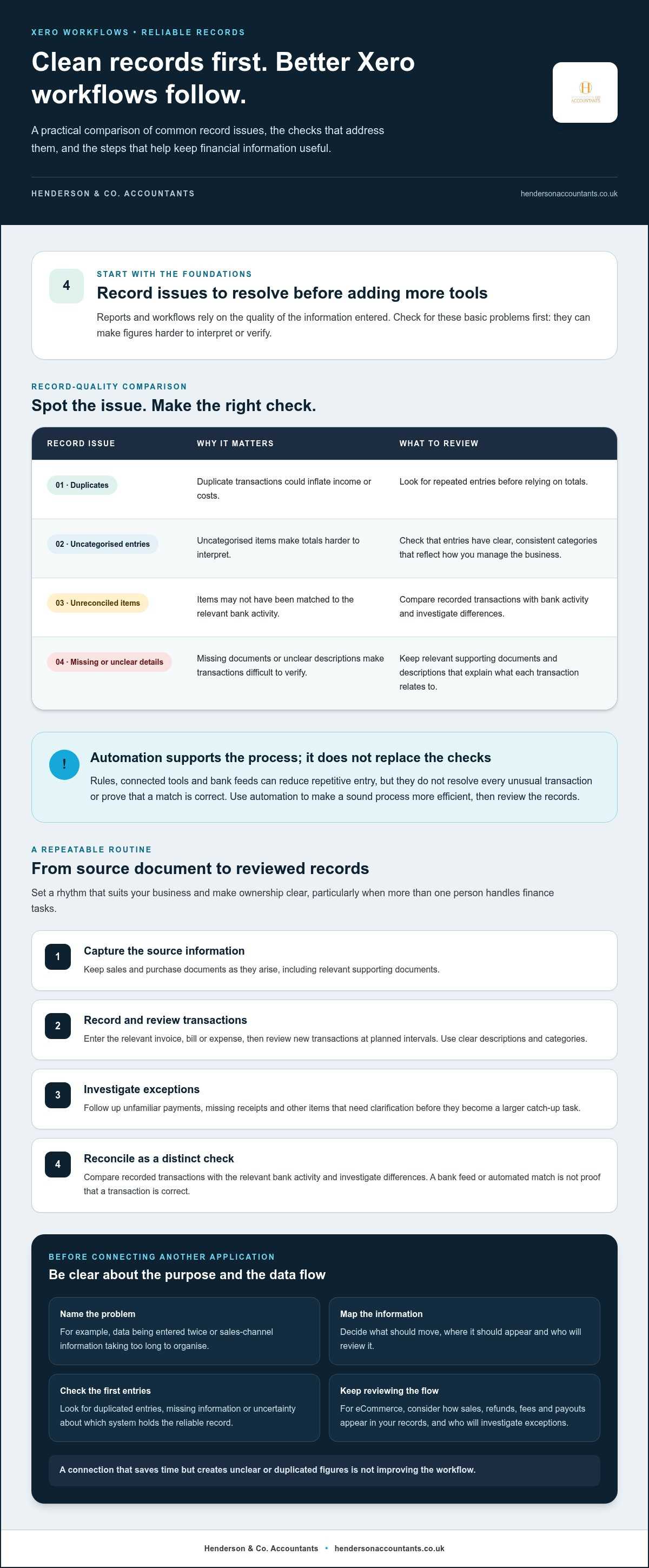
Before adding more tools, look for basic issues that can undermine your records:
- Duplicate transactions that could inflate income or costs.
- Uncategorised entries that make totals harder to interpret.
- Unreconciled items that haven’t been matched to the relevant bank activity.
- Missing documents or unclear descriptions that make a transaction difficult to verify.
For eCommerce businesses, keeping sales, fees, refunds and payouts organised takes careful bookkeeping. A consistent approach to eCommerce bookkeeping can make records easier to review and more useful for decisions. Start with clean inputs, then build workflows around the tasks you’ve chosen to improve.
Build More Useful Xero Workflows from the Features You Already Have
Once you know what you want to improve, connect the relevant Xero features into a clear sequence. A workflow might begin with a sales record or supplier document, continue with an invoice, bill or expense entry, and end with a transaction that has been reviewed and appears correctly in your financial information. Bank feeds can bring bank activity into that process, but they don’t replace checking that each item is understood and recorded correctly.
Automation is only as dependable as the information it receives and the checks that follow. Rules and connected tools may reduce repetitive entry, but they can’t resolve every unusual transaction or spot every mistake. Use automation to make a sound process more efficient, not as a reason to stop reviewing your records.
Use a consistent routine for everyday transactions
Set a regular rhythm that suits your business. Capture sales and purchase documents as they arise, review new transactions at planned intervals, then investigate exceptions such as an unfamiliar payment or missing receipt. Consistency helps prevent small queries from building into a larger catch-up task.
Use clear descriptions and categories so you can understand what transactions relate to later. For example, distinguish different types of sales or operating costs where that reflects how you manage the business. Agree who records, checks and follows up each item, particularly if more than one person handles finance tasks.
Keep bank reconciliation as a distinct review step: compare recorded transactions with the relevant bank activity and investigate differences. This is separate from entering bills or sales, and from understanding how a particular payment gateway reports activity. Don’t treat a bank feed or automated match as proof that a transaction is correct.
Choose integrations for a clear business purpose
Before connecting another application, name the problem it should solve. Perhaps sales data is being entered twice, or information from a sales channel takes too long to organise. Map what data should move, where it should appear and who will review it. This makes it easier to spot duplicate entries, missing information or uncertainty about which system holds the reliable record.
For an eCommerce business, a connection can affect sales, refunds, fees and payouts in different ways. Decide how these items should appear in your records and who will investigate exceptions. After setup, review the first entries carefully and keep checking the flow as your processes change. A connection that saves time but creates unclear or duplicated figures isn’t improving the workflow.
If you’re deciding which accounting software suits your online business, the Xero and QuickBooks eCommerce comparison can help you assess the fit before building further connections. Henderson & Co. Accountants provides eCommerce accounting and Xero setup support to help turn connected data into a workflow that’s easier to review. That practical discipline is central to getting the most out of your xero subscription.
Review Xero Plans, Integrations and Reports Against Your Actual Needs
A feature list can make a plan or app look appealing, but the better test is whether it solves a real problem in your business. Review your setup against the number and type of transactions you handle, who needs access, the reports you rely on and any gaps in your workflow. A higher plan or a larger collection of apps won’t automatically give you better financial control. Clear processes and dependable records matter more.
Decide whether your current plan still fits
Look at the functions available in your plan. Note which ones you use regularly, which address a recurring need and which aren’t relevant to your work. Consider how expected changes, such as adding a sales channel or bringing another person into the finance process, might affect your requirements. Xero’s plan inclusions can change, so review its latest information before making a decision.
Use a simple comparison to focus your review. Match current plan details and app capabilities against what your business needs, rather than assuming an upgrade or integration is necessary.
| Current need | Relevant Xero capability | Question to review |
|---|---|---|
| More people handling finance tasks | User access and collaboration options | Who needs access, and what should each person do? |
| Clearer sales and cost information | Reports and transaction categorisation | Can you identify the figures needed for regular decisions? |
| Less repeated data entry | Existing workflow tools or a connected app | Where does information get re-entered, and how will you check for duplicates? |
| Changing transaction activity | Plan capacity and available functions | Does the current setup still suit the volume and type of work? |
Make reports answer real business questions
Choose reports by starting with a decision, not a menu. If you need to plan upcoming payments, focus on information that helps you understand cash. If you’re reviewing sales performance, look for a useful view of revenue and costs over a consistent period. A report is helpful when it gives you information you can interpret and act on.
Reliable reporting depends on transactions being recorded consistently and assigned to suitable categories. If costs are coded inconsistently, comparisons between periods may be misleading. Missing or incomplete records can also leave gaps in the picture. Before relying on a report, check that the period is appropriate, the figures make sense and unusual movements can be explained.
For online sellers, reports are most useful when they reflect how sales, fees, refunds and other costs affect the business. Broader eCommerce accounting guidance can help put those figures into the context of running an online business. That’s the practical basis for getting the most out of your xero subscription: choose tools and reports for a defined need, then review whether they continue to support sound decisions.
Follow a Monthly Xero Review to Keep Your Subscription Working Well
A regular monthly review helps you spot gaps while the transactions are still familiar. It also gives you a pause before relying on reports to make decisions. Keep the process proportionate: the aim isn’t to investigate every figure from scratch, but to confirm that records are complete, identify exceptions and decide what needs attention.
Use a simple monthly close checklist
Work through the checks in the same order each month. Reviewing the records first makes the figures easier to interpret later.
- Gather outstanding documents. Collect receipts, supplier bills and other source records, then confirm that key sales and purchases for the period have been entered.
- Review unreconciled items. Look for transactions that remain unmatched, and investigate unexpected bank balances or entries you can’t readily explain. Note questions rather than guessing at an answer.
- Look for gaps and unusual balances. Check for missing documents, duplicate entries, uncategorised transactions or totals that appear out of line with the activity you recognise.
- Check the reporting period. Before interpreting a report, confirm that it covers the intended dates and includes the relevant records. Compare like with like, such as one month against another, rather than drawing conclusions from mismatched periods.
This order matters. A report can look complete while still reflecting missing documents or unresolved transactions. Resolve what you can, note anything that remains open, and then consider what the numbers are telling you.
Turn review findings into practical next actions
Give every follow-up an owner and a target date. For example, note that the person who handles purchases needs to obtain a missing supplier document, or that an unexplained balance needs an accountant’s review. A short list of specific actions is easier to manage than a collection of vague reminders.
Also note recurring friction. If the same details need to be entered more than once, or a particular type of transaction regularly arrives without useful information, record where the process breaks down. You can then decide whether clearer instructions, a revised workflow or an integration would address the cause. Don’t add a tool because of a one-off exception; look for a pattern and consider how you would check the change.
If a balance or report still doesn’t make sense after your review, flag it for your accountant rather than making an unsupported adjustment. Henderson & Co. provides bookkeeping and accounting support to help resolve open questions and make monthly processes more consistent. Arrange support with your Xero bookkeeping review to strengthen the quality of your records and the decisions built on them.
Keep the checklist and action notes together, then refine them as your business changes. That feedback loop is central to getting the most out of your xero subscription: each review helps improve the process, not just inspect the numbers.
Make Xero More Valuable as Your Business Grows
A finance setup that suited a single sales channel may become harder to manage as your online business adds marketplaces, payment providers or new ways to sell. Each channel can bring its own sales records, fees, refunds and payout timings. As transaction volumes rise, matching these moving parts by hand can take more time and make it harder to see how the business is performing.
Growth doesn’t automatically mean you need a different plan or another app. It does mean checking whether your current process still gives you consistent records and information in time to act. If figures are delayed or don’t agree across systems, the cause may be how data is handled, the quality of the records or the way your setup is configured.
Spot when existing processes need attention
Watch for signs that the workflow is no longer keeping pace: more repeated manual entry, sales figures that don’t align with payout records, recurring gaps in transaction details or reports that arrive too late to guide a decision. Note where each issue starts and how often it recurs. This helps distinguish a one-off query from a process that needs a closer look.
For instance, a growing seller might need to bring sales activity from several channels together while keeping refunds and fees visible enough to understand the final payout. If finance processes need attention beyond Xero alone, a broader outsourced finance guide for SMEs can help you consider the support required as the business develops.
Connect Xero use with specialist eCommerce accounting
For online sellers, useful financial information depends on how sales-channel data is organised and brought into the bookkeeping process. Specialist eCommerce accounting helps align those workflows with the way your business sells, so transaction records and reporting needs are considered together. The right approach depends on your channels, processes and the information you need to oversee the business.
Henderson & Co. provides Xero cloud accounting setup, bookkeeping, VAT return preparation and outsourced finance support. This support helps shape a setup around your systems and sales activity, then maintain clearer financial oversight as your requirements change. The practical starting point is to identify where information is getting stuck, clarify who handles each step and improve the process where it will make a useful difference.
If your reports are becoming harder to interpret or manual work is taking attention away from running the business, bring those specific issues into a conversation about your finance processes. Speak with Henderson & Co. about making Xero work harder for your business. A considered review can help you decide what to adjust, what to keep and where specialist eCommerce accounting support fits as you work towards getting the most out of your xero subscription.
Take the Next Step Towards Clearer Financial Oversight
Your next step doesn’t need to be a complete system overhaul. Choose one part of your finance process that’s causing friction and decide what a better outcome would look like. A focused change, followed by regular review, can help your Xero setup keep pace as your business develops. That steady approach is key to getting the most out of your xero subscription.
Henderson & Co. provides UK-wide accounting support for eCommerce businesses, including Xero cloud accounting setup, bookkeeping and outsourced finance services. Specialist guidance can help align your records and workflows with the way your online business operates, giving you a clearer foundation for future decisions.
Explore Xero and eCommerce accounting support from Henderson & Co.
With a practical routine and the right support, you can keep building financial processes that grow with your business.
Frequently Asked Questions
How can I get more value from my Xero subscription?
Getting the most out of your Xero subscription means choosing a practical business task to improve, then checking whether your setup makes it easier. For example, if you regularly spend time finding supplier receipts, set a consistent way to collect and attach them to the relevant records. Review whether the change saves effort and gives you better information. Keep what works and adjust processes that still cause delays or confusion.
Am I using the right Xero plan for my business?
The right plan is the one whose current features fit your day-to-day requirements without paying for functions you don’t need. Consider how many people need access, your transaction activity, reporting needs and essential workflows. Then compare those needs with Xero’s latest plan information, as inclusions can change. If your business is changing, assess the practical impact first rather than assuming you need to move to a higher plan.
Can Xero automate all of my bookkeeping?
No. Software and connected apps can help with repetitive steps, such as bringing information into a workflow, but they can’t reliably resolve every unusual transaction or missing record. An unfamiliar supplier payment, for example, may still need someone to check what it was for and record it appropriately. Keep a person responsible for reviewing exceptions and correcting errors. Automation works best when the process and source information are dependable.
How often should I review my Xero accounts?
Review your records at least monthly, with more frequent checks if waiting until month-end makes it hard to answer everyday questions. For instance, a business monitoring cash closely might look at recent activity during the month, then do a fuller review once the period is complete. The right rhythm depends on your transaction flow and decisions. Set a routine you can maintain, and make sure important queries don’t sit unresolved.
Do I need an accountant to use Xero?
You can use Xero to manage your records without an accountant, but professional support can help with setup, bookkeeping and interpreting information when your circumstances are more involved. This can be particularly useful for an online seller handling several sales channels, where sales, fees and refunds may need careful organisation. An accountant can also help connect day-to-day records with wider financial and tax reporting needs.
Which Xero integrations should my business use?
Choose integrations based on a specific task, not simply because an app is available. An online shop might assess whether a connection with Shopify addresses a sales-data problem, while a business taking payments through Stripe or PayPal may review how those records fit its bookkeeping process. Before adopting an app, consider overlap with existing tools, duplicate entries and who will check the information. Confirm current compatibility and capabilities before connecting systems.
Why do my Xero reports not match what I expected?
Differences can arise because a report covers the wrong dates, transactions are coded inconsistently or sales and payouts appear at different stages of the payment process. For example, a payout may not equal the original sales total if fees, refunds or timing differences are involved. Check the report period and underlying entries first. If the figures remain unclear, note the items in question and have your accountant review how they’ve been recorded.