
Reconciling Stripe Payments in Xero: UK Guide 2026

When reconciling stripe payments in xero, the Stripe payout in your bank account is only one part of the picture. A deposit that does not match your sales total does not necessarily mean income is missing: Stripe payouts can be reduced by fees, refunds and other adjustments before they reach your bank.
Stripe records individual customer payments; your bank shows the payout after deductions. Treating those figures as the same thing can leave unexplained differences and turn month-end bookkeeping into a cycle of manual fixes. The key is to follow the full trail, not just match the net deposit.
This guide explains how to connect Stripe activity to Xero and choose a consistent approach to recording payments and reconciling payouts. You’ll learn how to account for fees, refunds and disputes, investigate differences without mistaking adjustments for missing income, and keep clear records for routine bookkeeping and VAT review. Each step builds towards a repeatable process that makes your payment records easier to understand and manage.
Key Takeaways
- Separate individual customer payments from Stripe payouts so you know which figures should match your sales records and bank statement.
- Use a Stripe clearing account to keep gross payments, fees and refunds visible before the net payout reaches your bank.
- When reconciling stripe payments in xero, account for the activity behind each payout rather than forcing the bank deposit to match gross sales.
- Follow a consistent month-end workflow, checking that the payout period and included transactions align before matching entries.
- Build simple controls into your bookkeeping routine, including reviewing unmatched items and retaining supporting payout reports.
Reconciling Stripe Payments in Xero: Understand What Needs Matching
Reconciliation means checking that Stripe’s activity is represented by the right entries in Xero and that the resulting transfer agrees with the movement in your business bank account. The aim isn’t to make every figure identical. It’s to explain how customer transactions, fees, refunds and other adjustments lead to the amount paid out.
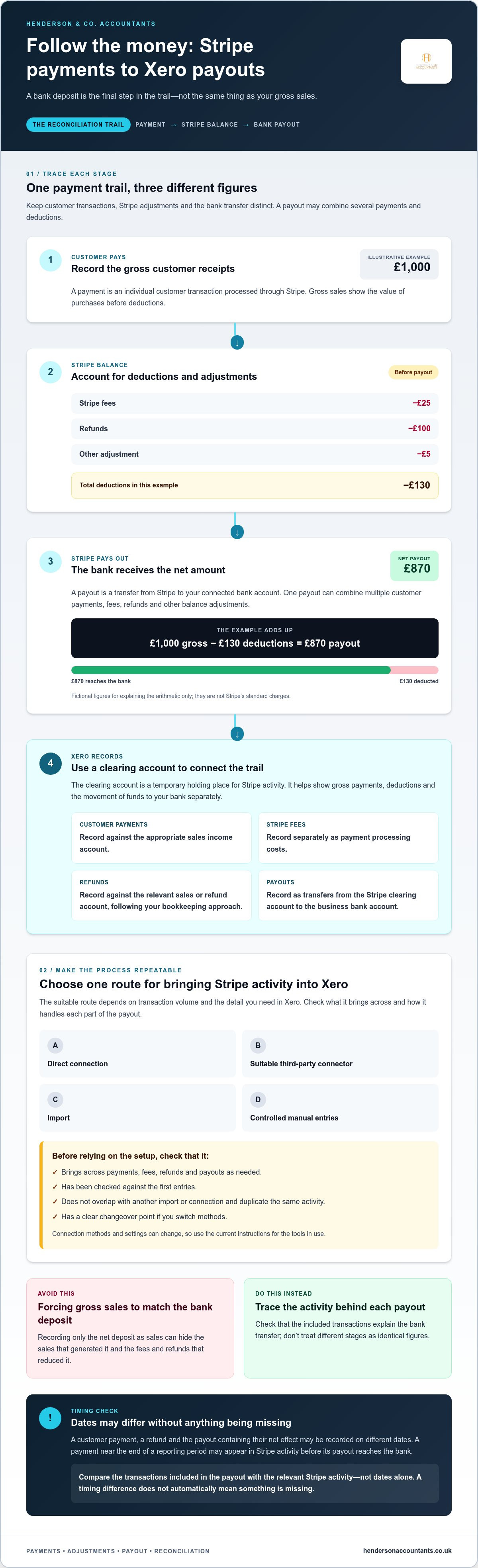
Think of this as three connected stages: a customer pays, the funds and adjustments appear in your Stripe balance, then Stripe transfers a payout to your bank. Stripe is a payment processing company that helps businesses accept payments online, as outlined in Stripe (company). Keeping these stages distinct gives you a clearer trail to follow in Xero.
Stripe payment versus payout: what is the difference?
A payment is an individual customer transaction processed through Stripe. A payout is a transfer of funds from Stripe to the bank account connected to your Stripe account. They describe different points in the money trail, so a payout isn’t necessarily a one-to-one match with a customer payment.
One payout may combine several customer payments, less fees and refunds, with other balance adjustments included. Your Xero records need to reflect the underlying activity as well as the bank transfer. Otherwise, you may see the deposit but have little visibility of the sales and deductions that explain it.
Why the net bank deposit does not equal sales
Gross sales record the value of customer purchases before deductions. The bank receives the net payout after relevant fees, refunds and other adjustments have been taken into account. Here’s a fictional example to show the arithmetic. These figures are illustrative only, not Stripe’s standard charges:
- Gross customer receipts: £1,000
- Stripe fees: −£25
- Refunds: −£100
- Other adjustment: −£5
- Net payout to the bank: £870
The £870 deposit doesn’t mean sales were only £870. It represents £1,000 in gross receipts after £130 in deductions. Recording only the deposit as sales would hide the difference between customer payments and the amount received, making it harder to see how fees and refunds affected the payout.
Matching only the net deposit can hide both the sales that generated it and the fees that reduced it.
Dates can add another layer of confusion. A customer payment, a refund and the payout containing their net effect may be recorded on different dates. A payment near the end of a reporting period, for example, could appear in Stripe activity before its payout reaches the bank. That timing difference doesn’t automatically mean something is missing. Compare the transactions included in the payout with the relevant Stripe activity, rather than relying on dates alone.
Once you understand which figures belong to each stage, reconciling stripe payments in xero becomes a matter of tracing the activity behind each payout, not forcing gross sales to equal the bank deposit.
Set Up Stripe and Xero Records for a Clear Reconciliation Trail
A clear setup makes each step of the money trail easier to follow. In Xero, a Stripe clearing account can act as a temporary holding place for payment activity: customer receipts are recorded there, fees and refunds are accounted for separately, and the payout movement reduces the balance as funds reach your bank. This helps you trace the difference between gross activity and cash received without treating them as the same figure.
A clearing account connects the dots between gross Stripe activity and the net cash that arrives in your bank. If it’s set up consistently, its balance can help show whether transactions are still awaiting payout or whether an item needs investigation.
Choose a consistent route for bringing Stripe activity into Xero
You can bring Stripe activity into Xero through a direct connection, a suitable third-party connector, an import or controlled manual entries. The right route depends on your transaction volume and the detail you need in Xero. Before setting one up, confirm what data it brings across and how it records payments, fees, refunds and payouts. Available connection methods and settings can change, so follow the current instructions for the tools you use.
Whichever route you choose, use one consistent process and check the first entries before relying on it. Avoid running overlapping imports or connections that bring in the same Stripe activity twice. Duplicate transactions can inflate recorded sales or fees and make genuine payout differences harder to spot. If you change methods, establish when the old process stops and the new one begins.
Map Stripe entries to sensible Xero accounts
Decide where each type of activity belongs before you start reconciling. Keep sales income, Stripe fees, refunds and clearing movements distinguishable in your bookkeeping records. A simple mapping might look like this:
- Customer payments: record against the appropriate sales income account.
- Stripe fees: record separately as payment processing costs.
- Refunds: record against the relevant sales or refund account, following your bookkeeping approach.
- Payouts: record as transfers from the Stripe clearing account to the business bank account.
In Xero, payment-service settings can affect which account receives transactions processed through a payment service. Review the account selection as part of setup, then check that the resulting entries follow your intended mapping. If payments are posted straight to the bank account while a separate import also records the same activity, you could create duplicates or lose the clear link between the Stripe balance and payout.
This structure supports the wider picture too. Consistent payment records sit alongside order, platform and expense records in eCommerce bookkeeping for UK sellers, helping you keep online sales activity organised as the business grows.
If setting up the connection or account mapping is becoming difficult to manage, Xero setup and bookkeeping support can help bring your payment records into a more consistent process.
Match Stripe Payouts, Fees and Refunds Without Forcing Differences
A payout is easier to explain when you can see the activity behind it. Start with the transactions included in the relevant Stripe payout, then check that each item has a corresponding entry in Xero. Only once the underlying activity is accounted for should you match the net transfer to the bank deposit. This avoids using sales income to plug a difference that actually relates to fees, refunds or another adjustment.
How Stripe fees and refunds affect the payout total
Fees reduce the cash Stripe transfers, but they don’t reduce the value of the original customer sale. Record the sale and fee as separate items so both remain visible. A refund may be deducted from a payout or appear as separate balance activity, depending on when it is processed. Use the relevant Stripe reports and Xero entries to establish what happened, rather than guessing from the deposit alone.
The figures below are fictional and for illustration only. They are not typical Stripe charges.
| Payout component | Illustrative amount | What it represents |
|---|---|---|
| Gross customer payments | £640 | Value of the sales before deductions |
| Stripe fees | −£16 | Payment processing costs |
| Refunds | −£80 | Money returned to customers |
| Other adjustment | −£4 | A separate item shown in Stripe activity |
| Net payout | £540 | Amount transferred to the bank |
Here, the bank deposit is £540, but the records show £640 in customer payments and separate deductions totalling £100. Don’t absorb the £16 fee into sales or treat it as unexplained missing income. Keep the components identifiable, and check the payout details against the transactions and entries that make up the total.
VAT treatment depends on the underlying transaction and the rules that apply to it. A Stripe fee, a customer sale and a refund aren’t automatically treated the same way for VAT purposes. Avoid applying one blanket treatment to every line. Keep the supporting transaction information and make sure the bookkeeping reflects the nature of each item.
What to do with disputes, adjustments and timing gaps
Disputes and other balance adjustments can affect the amount available for payout. Identify each one in the relevant Stripe records and record it consistently in Xero, rather than hiding it in sales or fees. The correct account depends on the nature of the item and your bookkeeping approach, so focus on clear descriptions and a reviewable record rather than assuming one account code fits every business.
A same-day bank match may not always be available. A payout can relate to activity recorded on different dates, so compare the transactions included in the payout with the payout details before treating a gap as an error. If the totals still differ, trace the unmatched amount to a specific fee, refund, dispute or adjustment. This is the practical discipline behind reconciling stripe payments in xero: explain each component before confirming the bank movement.
If recurring payout differences are becoming difficult to review, eCommerce bookkeeping support can help you bring payment records into a more consistent process.
Reconcile Stripe Payments in Xero: A Repeatable Month-End Workflow
A steady routine helps you spot differences while the relevant payout details are easy to review. Work from Stripe activity towards the bank entry, checking each part of the trail before you confirm a match in Xero. The process below gives you a consistent way to handle payouts, whether you review them individually or as part of a month-end bookkeeping session.
A practical sequence for each payout
Follow these steps for each payout you need to reconcile:
- Open the payout details in Stripe. Note the payout reference, date and amount, then identify the transactions and adjustments included. Use the relevant payout period rather than assuming the bank date and transaction dates will be the same.
- Check that the period and contents align. Compare the transactions included in the payout with the Stripe activity recorded for that period. Make sure you’re not including an item from an earlier or later payout simply because its date looks close.
- Review the Xero entries. Confirm that the related customer payments, fees, refunds and other identified items have been recorded in the intended accounts. Look for missing or duplicated entries before proceeding.
- Check the payout movement. Confirm that the net amount is represented as a movement from the Stripe clearing account to the business bank account, in line with your bookkeeping setup.
- Match the bank entry. Compare the payout amount and reference with the relevant bank statement line in Xero. Match it only when the underlying activity explains the transfer and the totals agree.
This order matters. Matching the bank line first can make a payout look complete even when its component transactions haven’t been reviewed. A consistent routine for reconciling stripe payments in xero keeps the underlying records and the bank movement connected.
Checks before closing the reconciliation
If the figures don’t line up, pause before changing an entry. Compare the payout details with Stripe’s transaction records and the corresponding Xero history. Check for a duplicate import, an unmatched transaction, an entry posted to the wrong account, or an item included in a different payout period. Review references and dates together; a date difference on its own doesn’t prove that a record is wrong.
For general guidance on matching bank statement lines in Xero, follow this Xero bank reconciliation guide. The same careful approach helps you distinguish a genuine mismatch from a timing difference.
If an item remains unresolved, keep a short note of the amount, the records reviewed and what still needs investigation. That gives you a clear starting point at the next review instead of repeating the same checks. For support with making payment reconciliation part of a reliable bookkeeping routine, get help with Xero bookkeeping.
Keep Stripe-to-Xero Reconciliation Reliable as Your Online Business Grows
A process that works when you have a small number of payouts may become harder to maintain as order volumes rise or sales channels multiply. For businesses expanding into physical retail or omnichannel operations, consulting an EPOS consultancy UK can help ensure till systems and card payment setups integrate cleanly with your financial reporting. Set a review rhythm that fits your transaction volume and bookkeeping routine. For higher volumes, checking Stripe activity daily or weekly can help you spot issues while they’re easier to trace. If activity is lighter, a regular weekly or month-end review may be workable, provided it leaves enough time to resolve differences before your accounts are finalised.
Keep the checks simple and repeatable. Compare payout totals with the supporting Stripe records, review unmatched items and retain the reports used to explain each payout. Consistent records also support wider oversight of sales and costs across your business. For the broader picture, the eCommerce accounting guide for UK sellers explains how payment records fit into the accounting needs of an online business.
Signs the reconciliation process needs attention
Patterns often tell you more than a single mismatch. Recurring unmatched payouts, unexplained differences or frequent manual corrections may point to a process that needs reviewing. Repeated duplicate entries can indicate that two import routes are bringing in the same activity. Don’t adjust ledger entries just to clear a difference. First investigate when the pattern began and compare the related Stripe records, Xero entries and connection settings.
A short review log can make that investigation easier. Note the payout reference, the issue found and the action taken. If the same issue returns, you’ll have a clearer view of whether it relates to timing, account mapping, imports or a change in how payments are processed.
When specialist eCommerce accounting support can help
As your business adds sales channels or processes more transactions, payment flows and bookkeeping routines can become harder to oversee. Specialist support can help review how activity moves from Stripe into Xero, whether account mappings remain consistent and where manual work is recurring. Henderson & Co. Accountants supports online businesses with eCommerce accounting, Xero setup and bookkeeping, helping sellers make their records easier to manage as their operations develop.
Accurate payment records also contribute to a clearer basis for VAT review. Henderson & Co. Accountants’ VAT return preparation can sit alongside bookkeeping support, so relevant records are organised for the reporting process. If reconciling stripe payments in xero is taking repeated corrections or becoming difficult to fit into month-end, a review of the wider process may help identify a more manageable routine.
For support with building a clearer payment and bookkeeping process, explore eCommerce accounting support.
Make Your Payment Records Ready for What Comes Next
A dependable reconciliation routine can do more than tidy up month-end. It gives you a steadier foundation for understanding how your online business is performing as its sales activity changes. Once reconciling stripe payments in xero becomes part of a consistent bookkeeping process, you can spend less time revisiting old entries and more time using your records to guide decisions.
Henderson & Co. Accountants supports eCommerce and digital businesses with specialist accounting, Xero setup, bookkeeping and VAT return preparation. This support can help bring payment records into a wider accounting process that suits the way your business operates.
Explore eCommerce accounting support and take a confident next step towards clearer, more manageable records.
Frequently Asked Questions
How do you reconcile Stripe payouts in Xero?
Trace each payout back to the Stripe activity and Xero entries that explain it, then match the resulting amount to the corresponding bank transaction. Check the payout reference and the transactions included before confirming the match. If the figures differ, look for entries recorded in another period, refunds or adjustments, rather than posting a balancing amount straight away. This gives you a clear audit trail for each transfer.
Why does my Stripe payout not match my Xero sales total?
A payout can be lower than recorded sales because Stripe may deduct processing fees, refunds or other adjustments before transferring funds. Timing can also affect the comparison: the bank may show a payout on a different date from the customer payments included in it. Compare the payout’s included activity with your Xero records, and check whether you’re comparing the same transactions and period before treating the difference as an error.
Do Stripe fees need to be recorded separately in Xero?
Yes, recording fees separately from sales makes the cost of taking payments visible and avoids understating sales income. For example, if a customer pays £100 and Stripe deducts a fee before payout, your records should show the sale and the fee as distinct activity, rather than treating the smaller bank receipt as the sale. Apply a consistent account mapping and review the fee records against Stripe’s supporting transaction information.
Can Stripe connect directly to Xero?
Stripe activity can be brought into Xero through an available connection, a suitable connector or an import, depending on the setup you use. Some setups can also use a Stripe bank feed. Connection features and available options can change, so follow the current setup instructions and review what data the method transfers. Check that it brings in the level of payment, fee and refund detail your bookkeeping process needs, without duplicating another import.
What is a Stripe clearing account in Xero?
A Stripe clearing account is a bookkeeping account used to track payment activity between the customer transaction and the transfer to your business bank. It helps distinguish funds processed through Stripe from cash already received in the bank. If the account carries an unexpected balance after reviewing a payout period, use the underlying Stripe and Xero records to identify what remains outstanding. Don’t clear it with an unexplained adjustment.
How do I fix duplicate Stripe transactions in Xero?
First identify which connection, import or manual entry created each duplicate, then compare the entries with Stripe’s transaction records. Check whether either Xero entry has already been reconciled or included in a report before changing it. Correct or remove the duplicate in a way that preserves the record of what happened, and review the import setup to prevent the same activity arriving twice. Avoid deleting entries blindly, as that can disrupt linked records.
How often should I reconcile Stripe payments in Xero?
Choose a frequency that fits your transaction volume and bookkeeping routine. If payments and payouts are frequent, reviewing activity more often can help you investigate exceptions while the details are easy to find. A business with lighter activity may use a regular weekly or month-end check. Whichever rhythm you choose, apply it consistently and leave time to resolve unmatched items before relying on the records for reporting or VAT review.